


Insecure Logging
1. Goal
Identify if the DIVA application insecurely logs sensitive user information (such as credentials, PII, or financial data) to the Android system log (logcat).
2. Static Analysis
We searched the decompiled source code for standard Android logging methods (Log.d, Log.e, Log.i, Log.w, Log.v).
•
Finding: We discovered an insecure logging practice in jakhar.aseem.diva.LogActivity.
•
Details: The application takes a credit card number as input from an EditText field and attempts to process it via the processCC(String) method. The processCC() method intentionally throws a RuntimeException. In the catch block, the application logs the exception along with the raw credit card number in plain text:
Log.e("diva-log", "Error while processing transaction with credit card: " + cctxt.getText().toString());
Java
복사
•
Relevance: Any malicious application with the READ_LOGS permission (or any user connected via ADB) can read the system log and extract the user's credit card number.
3. Dynamic Execution & Verification
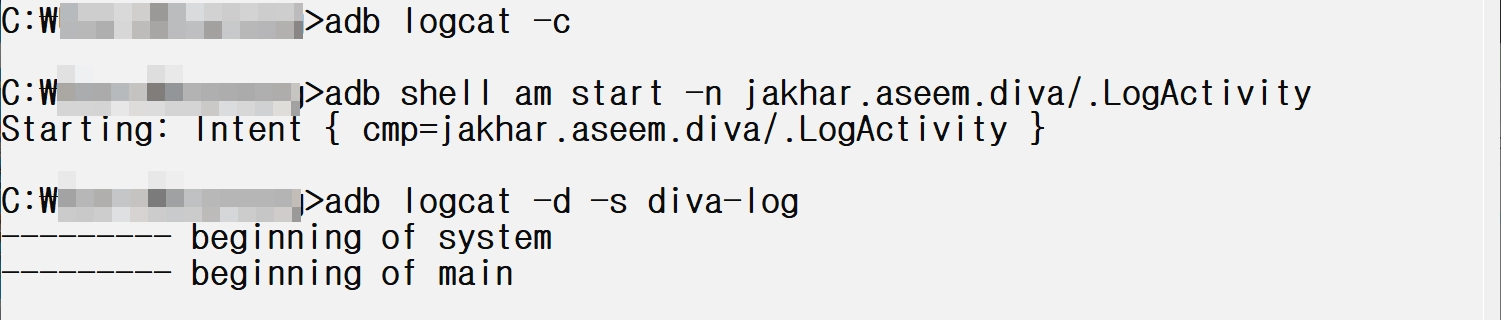
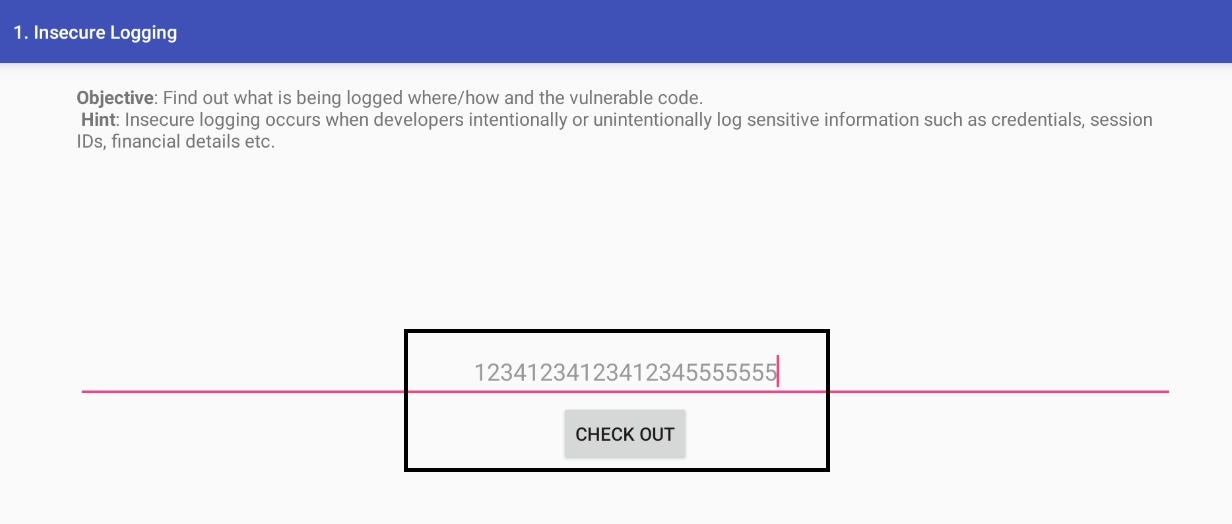
To verify the vulnerability, we launched the LogActivity, simulated a user entering a credit card number, and monitored the Android system log.
Verification Steps:
1.
Start the LogActivity and clear the logcat:
adb logcat -c
adb shell am start -n jakhar.aseem.diva/.LogActivity
Bash
복사
2.
Input a dummy credit card number (e.g., 1234123412341234) and click "Check out".
3.
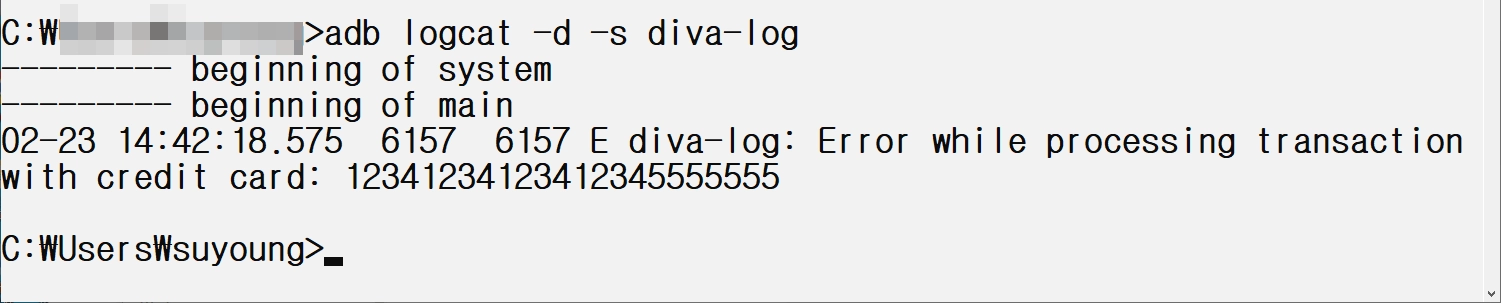
Monitor the logcat specifically for the diva-log tag:
adb logcat -d -s diva-log
Bash
복사
Findings:
The system log successfully captured the plain-text credit card number, confirming the vulnerability:
E diva-log: Error while processing transaction with credit card: 1234123412341234
Plain Text
복사
검증(Insecure Logging)
Hardcoding Issues - Part 1
1. Goal
Identify hardcoded sensitive information (like passwords, API keys, or secret tokens) within the DIVA application's source code, specifically for the "Hardcoding Issues - Part 1" exercise.
2. Static Analysis
We analyzed the decompiled source code of the DIVA app using JADX.
•
Target Activity: jakhar.aseem.diva.HardcodeActivity
•
Finding: A hardcoded string used for authentication was discovered directly in the Java source code.
•
Details: In the access(View view) method, which is triggered when the user attempts to log in, the application retrieves the text from the input field and explicitly compares it to the hardcoded string "vendorsecretkey".
public void access(View view) {
EditText hckey = (EditText) findViewById(R.id.hcKey);
if (hckey.getText().toString().equals("vendorsecretkey")) {
Toast.makeText(this, "Access granted! See you on the other side :)", 0).show();
} else {
Toast.makeText(this, "Access denied! See you in hell :D", 0).show();
}
}
Java
복사
•
Relevance: Storing secrets directly in the source code is extremely insecure. Attackers can easily extract these secrets by decompiling the APK, allowing unauthorized access without needing to intercept network traffic or bypass security measures dynamically.
3. Dynamic Execution & Verification
To verify this vulnerability, we can simply use the discovered secret in the application.
Verification Steps:
1.
Open the OWASP DIVA app on the emulator.
2.
Navigate to the "1. HARDCODING ISSUES - PART 1" menu.
3.
In the text field, enter the extracted secret: vendorsecretkey.
4.
Click the "ACCESS" button.
Findings:
The application displays a Toast message reading "Access granted! See you on the other side :)", confirming that the hardcoded credential successfully bypassed the authentication mechanism.
Verify(Hardcoding Issues - Part 1)
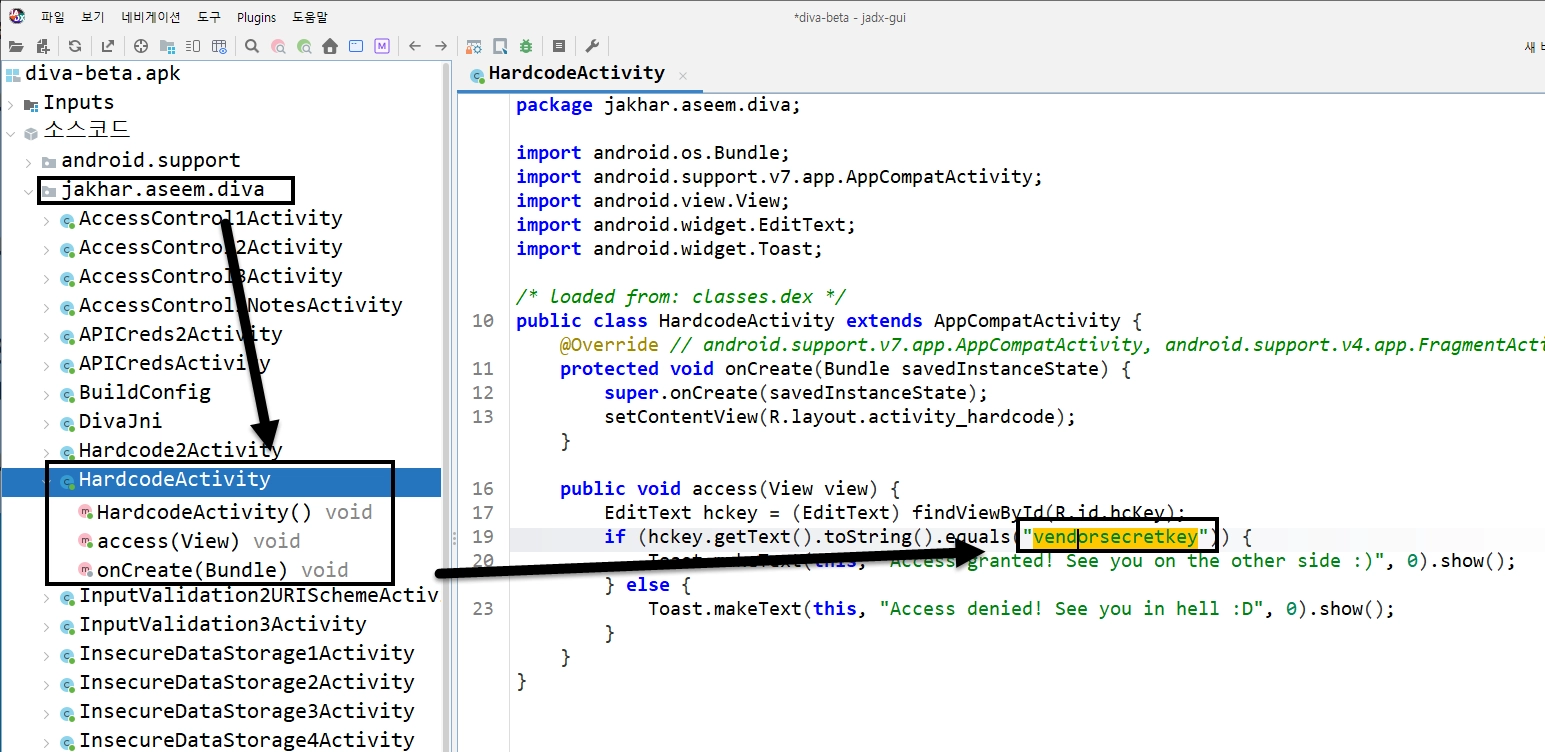
jadx-mcp를 이용해서 분석한 결과 보고서에서 언급한 jakhar.aseem.diva.HardcodeActivity에서 access(View view)을 확인해보면 하드코딩 된 키가 존재하는 것을 확인할 수 있다.
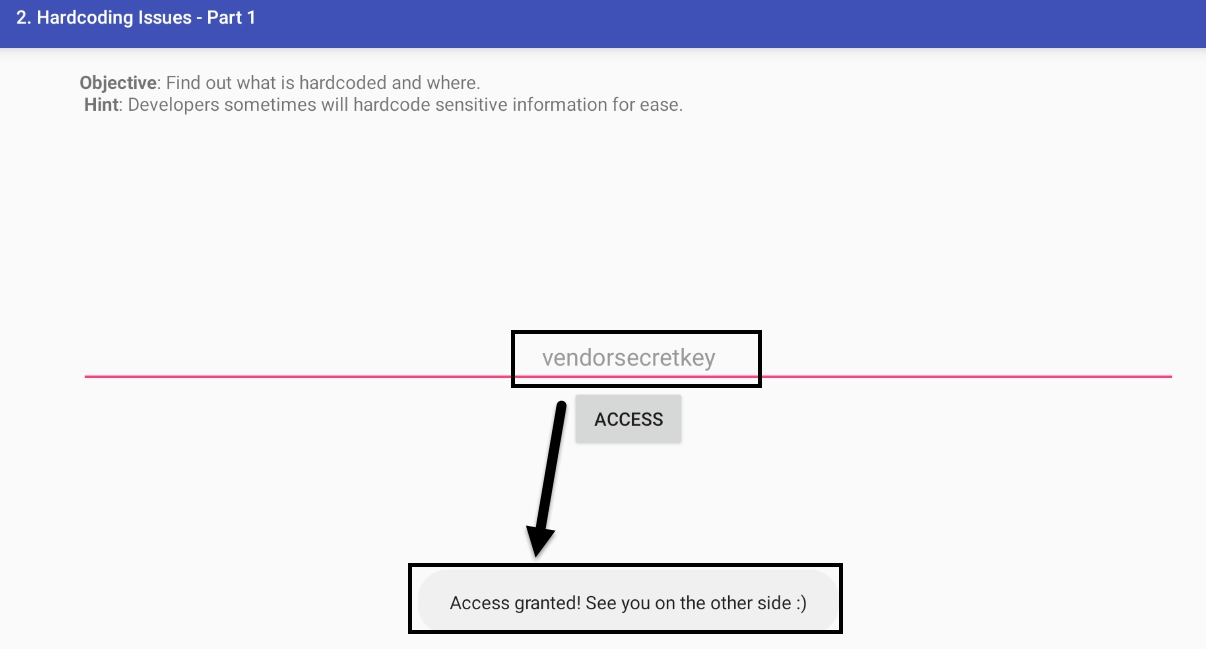
실제 앱에서 확인해보면 “Access granted!” 메세지를 확인할 수 있다.
Insecure Data Storage - Part 1
1. Goal
Analyze how the DIVA application handles sensitive user credentials internally, specifically looking for insecure storage practices like plaintext data storage in SharedPreferences.
2. Static Analysis
Using the JADX decompiled codebase, we analyzed jakhar.aseem.diva.InsecureDataStorage1Activity.
•
Target Activity: InsecureDataStorage1Activity
•
Finding: The application uses the Android SharedPreferences framework to save the username and password without any form of encryption.
•
Details: When the user clicks the "SAVE" button, the saveCredentials function retrieves the strings from the EditText fields and saves them directly via the SharedPreferences.Editor.putString() method.
public void saveCredentials(View view) {
SharedPreferences spref = PreferenceManager.getDefaultSharedPreferences(this);
SharedPreferences.Editor spedit = spref.edit();
EditText usr = (EditText) findViewById(R.id.ids1Usr);
EditText pwd = (EditText) findViewById(R.id.ids1Pwd);
spedit.putString("user", usr.getText().toString());
spedit.putString("password", pwd.getText().toString());
spedit.commit();
Toast.makeText(this, "3rd party credentials saved successfully!", 0).show();
}
Java
복사
•
Relevance: Storing sensitive data like passwords in plain text within SharedPreferences is a critical vulnerability. Any rooted device, malicious application with root privileges, or anyone with physical access (and ADB debugging enabled) can retrieve this information.
3. Dynamic Execution & Verification
To verify this, we launched the activity, input test credentials, and inspected the app's internal storage directory via ADB.
Verification Steps:
1.
Launch the InsecureDataStorage1Activity via the app menu or ADB:
adb shell am start -n jakhar.aseem.diva/.InsecureDataStorage1Activity
Bash
복사
2.
Enter a test username (e.g., admin) and a password (e.g., secretpass), then click SAVE.
3.
Use a root shell via ADB to inspect the SharedPreferences XML file:
adb shell cat /data/data/jakhar.aseem.diva/shared_prefs/jakhar.aseem.diva_preferences.xml
Bash
복사
Findings:
The XML file output distinctly shows the sensitive credentials stored in plain text:
<?xml version='1.0' encoding='utf-8' standalone='yes' ?>
<map>
<string name="password">secretpass</string>
<string name="user">admin</string>
</map>
XML
복사
Verify(Insecure Data Storage - Part 1)
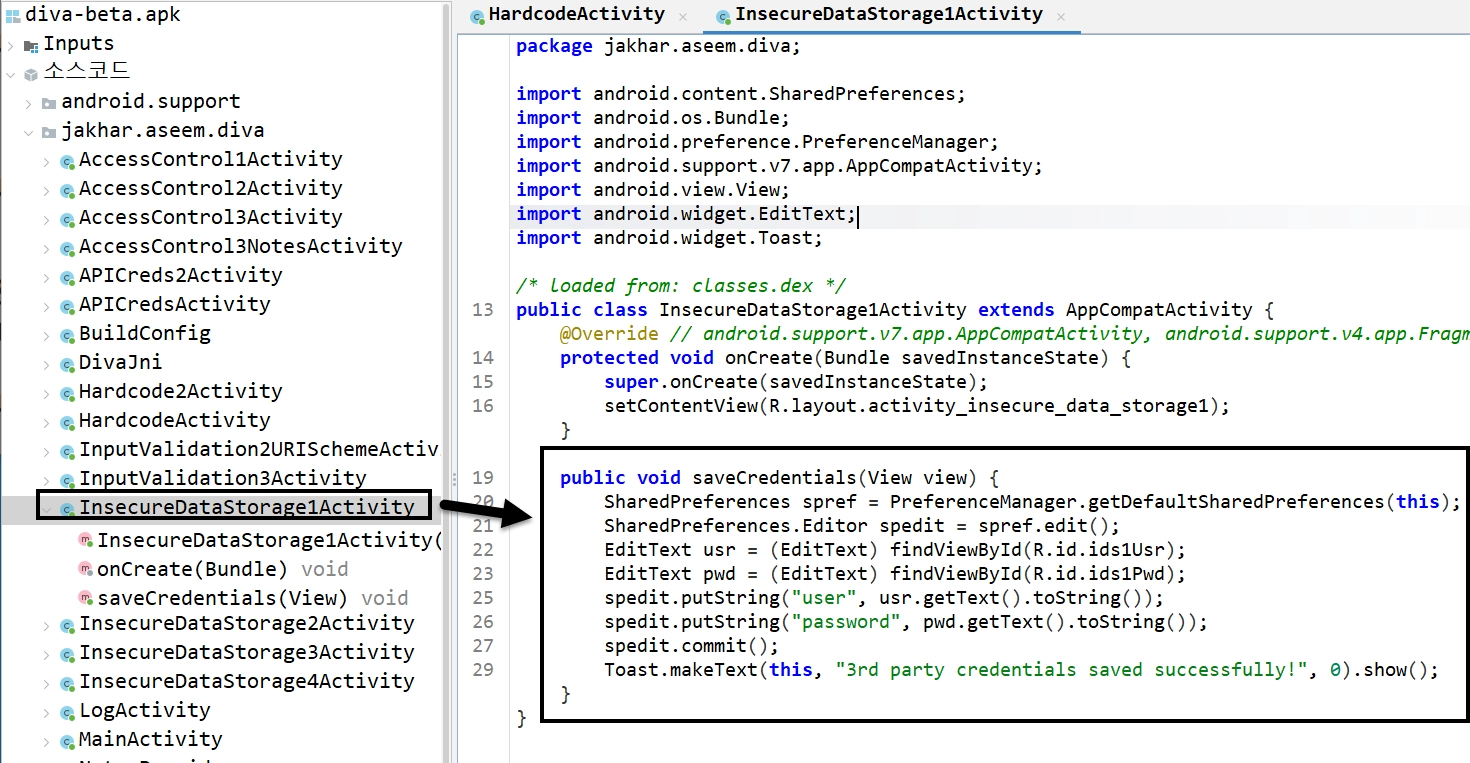
jadx-mcp를 이용해서 분석한 결과 보고서에서 언급한 jakhar.aseem.diva.InsecureDataStorage1Activity을 확인해보면 saveCredentials 메소드에서 SharedPreferences 암호화하지 않고 user와 password를 저장하는 것을 확인할 수 있다.

실제 xml 파일을 확인해보면 user와 password가 평문으로 저장 되어있다.
Insecure Data Storage - Part 2
1. Goal
Analyze how the DIVA application handles sensitive user credentials, specifically identifying insecure practices related to SQLite database storage in "Insecure Data Storage - Part 2".
2. Static Analysis
Using the JADX decompiled codebase, we analyzed jakhar.aseem.diva.InsecureDataStorage2Activity.
•
Target Activity: InsecureDataStorage2Activity
•
Finding: The application creates a local SQLite database and stores the entered username and password in plain text.
•
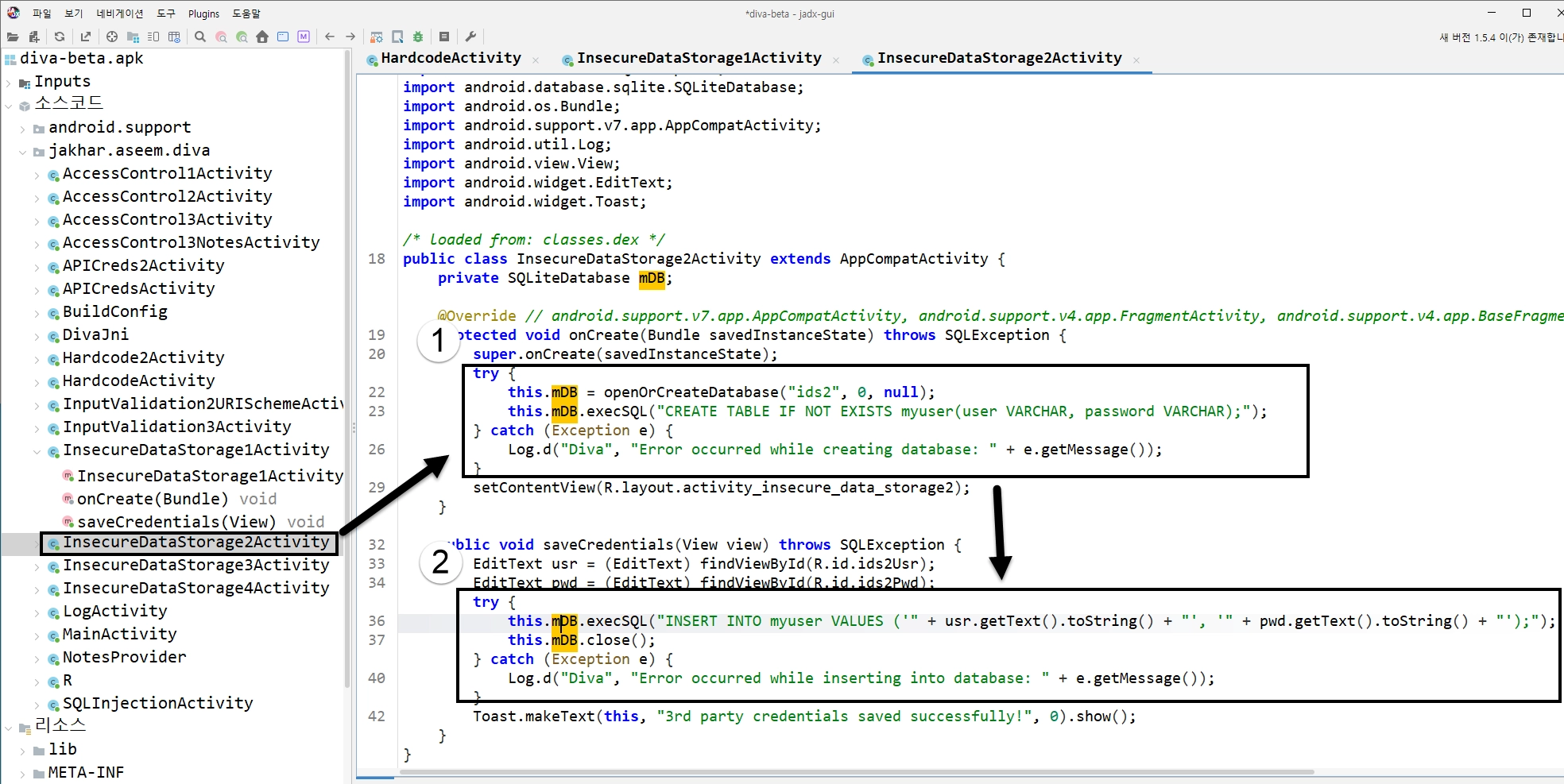
Details: When the user clicks the save button, the application opens (or creates) an SQLite database named ids2. It then executes raw SQL statements (INSERT INTO myuser VALUES (...)) using string concatenation to insert the text entered into the R.id.ids2Usr and R.id.ids2Pwd fields.
public void saveCredentials(View view) throws SQLException {
EditText usr = (EditText) findViewById(R.id.ids2Usr);
EditText pwd = (EditText) findViewById(R.id.ids2Pwd);
try {
this.mDB.execSQL("INSERT INTO myuser VALUES ('" + usr.getText().toString() + "', '" + pwd.getText().toString() + "');");
this.mDB.close();
} catch (Exception e) {
Log.d("Diva", "Error occurred while inserting into database: " + e.getMessage());
}
Toast.makeText(this, "3rd party credentials saved successfully!", 0).show();
}
Java
복사
•
Relevance: Storing passwords and sensitive information directly into an unencrypted SQLite database (/data/data/jakhar.aseem.diva/databases/ids2) is a critical vulnerability. Any rooted device or user with ADB shell access can dump this database and extract all stored credentials without resistance.
3. Dynamic Execution & Verification
To verify this, we launched the activity, inputted test credentials, and queried the internal SQLite database using ADB.
Verification Steps:
1.
Launch the InsecureDataStorage2Activity via the app menu or ADB:
adb shell am start -n jakhar.aseem.diva/.InsecureDataStorage2Activity
Bash
복사
2.
Enter a test username (e.g., admin2) and a password (e.g., secretpass2), then click SAVE.
3.
Use a shell via ADB to query the myuser table in the ids2 database:
adb shell "sqlite3 /data/data/jakhar.aseem.diva/databases/ids2 'SELECT * FROM myuser;'"
Bash
복사
Findings:
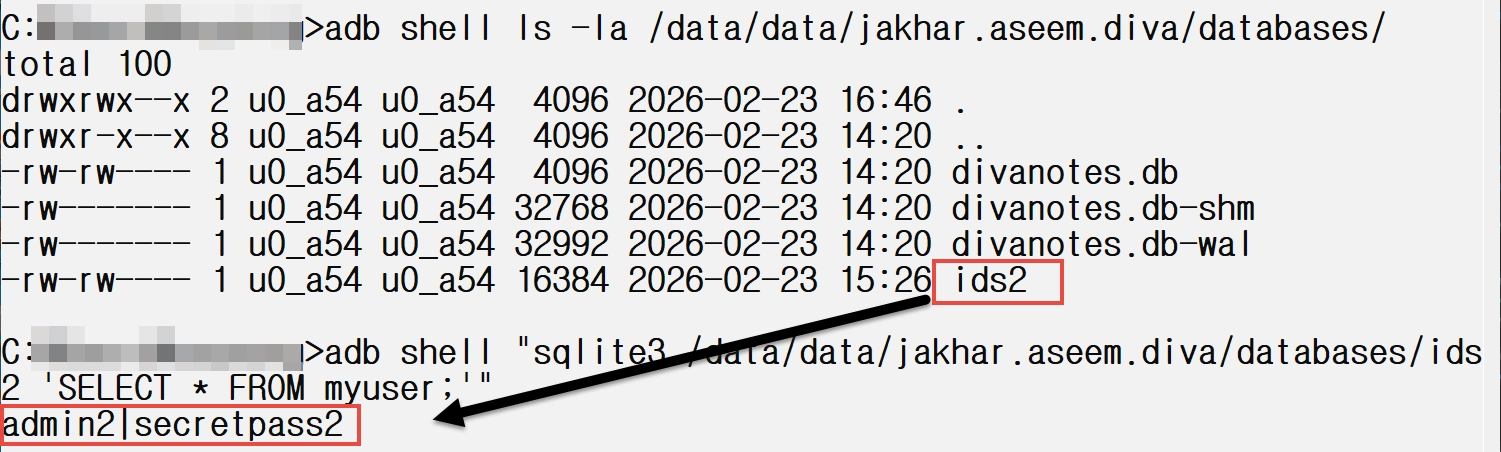
The SQLite query returns the credentials stored in plain text:
admin2|secretpass2
Plain Text
복사
Verify(Insecure Data Storage - Part 2)
•
분석 대상: jakhar.aseem.diva.InsecureDataStorage2Activity
•
취약점: 이번에는 SharedPreferences 대신 앱 내부에서만 접근 가능한 고유 **SQLite 데이터베이스 (ids2)**를 생성하여 사용자의 중요 계정 정보(아이디, 비밀번호)를 평문(Plaintext)으로 저장
•
동적 검증: ADB를 통해 해당 액티비티를 실행한 후, admin2 / secretpass2 라는 자격 증명을 입력하고 저장 버튼을 누름. 그 다음 adb 쉘에서 sqlite3 명령어를 사용해 /data/data/jakhar.aseem.diva/databases/ids2 DB의 myuser 테이블을 조회해 보니, 아래와 같이 평문으로 저장된 데이터를 성공적으로(하지만 보안상으로는 안전하지 않게) 뽑아낼 수 있었음.
Insecure Data Storage - Part 3
1. Goal
Analyze how the DIVA application handles sensitive user credentials, specifically identifying insecure practices related to temporary file storage in "Insecure Data Storage - Part 3".
2. Static Analysis
Using the JADX decompiled codebase, we analyzed jakhar.aseem.diva.InsecureDataStorage3Activity.
•
Target Activity: InsecureDataStorage3Activity
•
Finding: The application creates a temporary file in the app's internal data directory and writes the username and password into it in plain text.
•
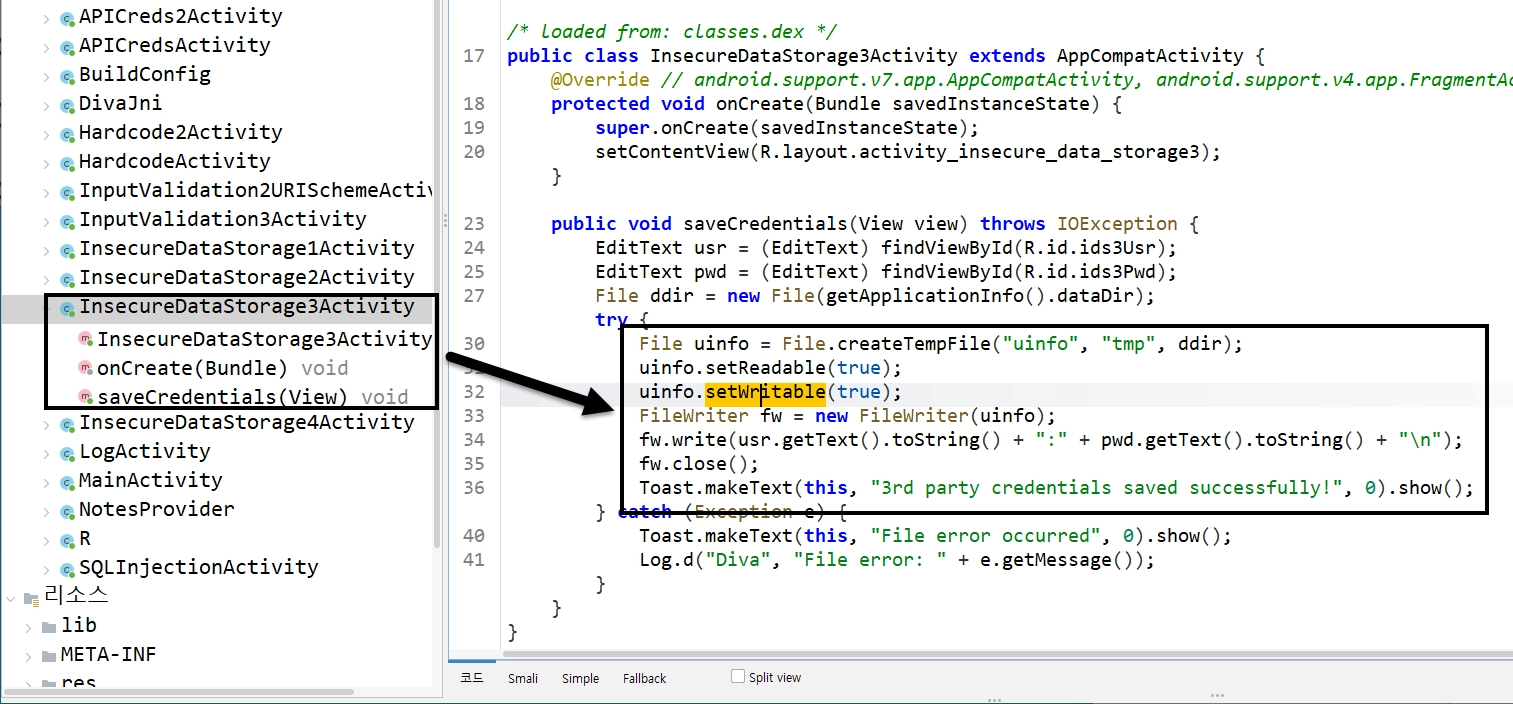
Details: When the user clicks the save button, the application retrieves the app's dataDir (which corresponds to /data/data/jakhar.aseem.diva/), and uses File.createTempFile("uinfo", "tmp", ddir) to create a new file. It attempts to set the readability and writability (using uinfo.setReadable(true) and uinfo.setWritable(true)). It then concatenates the username and password with a colon (:) separator and writes this string to the file using a FileWriter.
public void saveCredentials(View view) throws IOException {
EditText usr = (EditText) findViewById(R.id.ids3Usr);
EditText pwd = (EditText) findViewById(R.id.ids3Pwd);
File ddir = new File(getApplicationInfo().dataDir);
try {
File uinfo = File.createTempFile("uinfo", "tmp", ddir);
uinfo.setReadable(true);
uinfo.setWritable(true);
FileWriter fw = new FileWriter(uinfo);
fw.write(usr.getText().toString() + ":" + pwd.getText().toString() + "\\n");
fw.close();
// ...
} catch (Exception e) {
// ...
}
}
Java
복사
•
Relevance: Storing passwords and sensitive information directly into unencrypted temporary files within the device's internal storage is a critical vulnerability. As with previous parts, any rooted device or user with ADB shell access can read this temporary file and recover the credentials. Furthermore, relying on temporary files that are not properly cleaned up after use increases the window of opportunity for an attacker.
3. Dynamic Execution & Verification
To verify this, we launched the activity, input test credentials, and inspected the internal data directory using ADB.
Verification Steps:
1.
Launch the InsecureDataStorage3Activity via the app menu or ADB:
adb shell am start -n jakhar.aseem.diva/.InsecureDataStorage3Activity
Bash
복사
2.
Enter a test username (e.g., admin3) and a password (e.g., secretpass3), then click SAVE.
3.
Use a root shell via ADB to locate the temporary file and read its contents:
adb shell ls -la /data/data/jakhar.aseem.diva/uinfo*
adb shell cat /data/data/jakhar.aseem.diva/uinfo*tmp
Bash
복사
Findings:
A temporary file with a random number suffix was generated, and reading it printed our credentials exactly as they were written:
-rw------- 1 u0_a54 u0_a54 19 2026-02-23 17:00 /data/data/jakhar.aseem.diva/uinfo6313888513875435009tmp
admin3:secretpass3
Bash
복사
Verify(Insecure Data Storage - Part 3)
•
분석 대상: jakhar.aseem.diva.InsecureDataStorage3Activity
•
취약점: 이번에는 중요한 계정 데이터(아이디 및 비밀번호)를 앱의 내부 저장소(/data/data/jakhar.aseem.diva/) 경로에 File.createTempFile("uinfo", "tmp", ...)를 이용해 임시 파일 생성 후 평문(Plaintext)으로 저장하는 취약점
◦
createTempFile() 함수로 임시 파일을 생성하고 주요 정보를 평문으로 저장
▪
파일 이름 규칙 : uinfo+[random number]+tmp
•
ex1) uinfo4829103847561928tmp
•
ex2) uinfo1029384756tmp
•
동적 검증: ADB를 통해 해당 액티비티를 실행한 후 admin3 / secretpass3를 입력하여 저장. 생성된 파일을 검증해 보니 다음과 같이 유저의 크리덴셜 정보가 고스란히 저장되어 있음

◦
와일드카드(*)를 이용하면 파일을 열어볼 수 있고 해당 파일에 주요 정보 저장 확인